
shortcuts
Quick entry shortcut
Written by
Drea
Published on
12/23/2025

===
publishAt: 2025-10-30T01:36:02+01:00
There are four apps I use constantly throughout my day - 📝 Apple Notes, 🐻 Bear Notes, ✅ Apple Reminders, and 📅 Apple Calendar. I wanted a single point of entry to quickly add text to any of these apps.
I considered Drafts, but despite trying it several times over the years it has never stuck with me.
So I created a quick entry system using Apple Shortcuts and the action button in my iPhone. I have never found Shortcuts easy to use, but Gemini Ai is great at providing step-by-step instructions for creating a shortcut that does exactly what I need it to do.
Activating the shortcut prompts me to enter text.
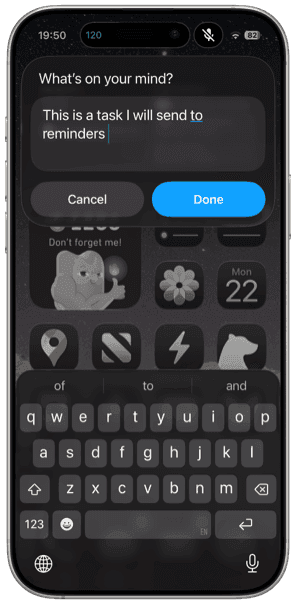
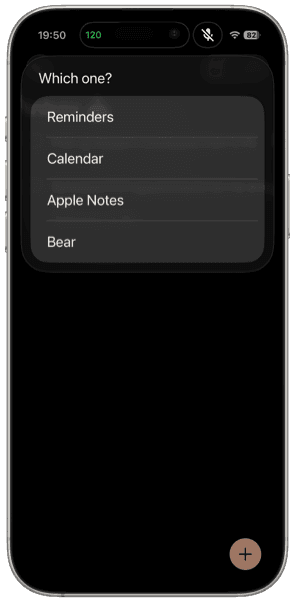
After text is entered, a prompt appears to pick an app. After this screen, any prompt is app specific. For the notes apps, the text automatically generates a new note in my default location. For calendar and reminders I get prompts to add specific info related to the event or task.
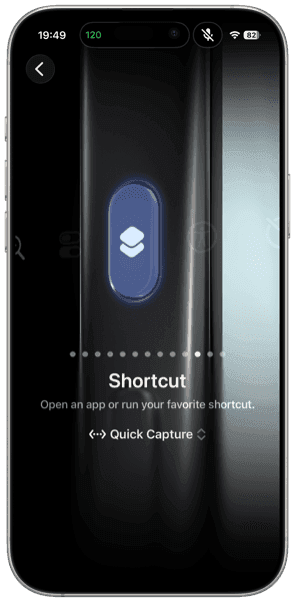
The best part is this shortcut can be activated using the action button on my iPhone.
There’s probably a lot more I could do with this shortcut, but this simple approach works for me.
Latest
More from the site
Drea
iphoneography
The best camera is the one you have in your hand
#iphoneography From the moment I bought a cell phone with a camera on it, I was obsessed with taking pictures with a mobile device. There was something about the portability of my phone, the "in-the-m
Read post
Drea
music
Apple Music After Years of Spotify
#music #applemusic Leaving Spotify I was once a diehard Spotify addict. I love music and Spotify is great for music. Earlier this year, however, my issues with Spotify built up to the point where I w
Read post
Drea
nationalparks
Acadia National Park
#nationalparks A few select photos from our recent adventure to Acadia National Park in Maine. An evening view of The Bubbles from Jordan Pond. A cute little frog that we spotted while hiking aroun
Read post