
productivity
Tech Stack Going into 2026
Written by
Drea
Published on
12/14/2025
#productivity #applenotes #applereminders #ai #goodlinks
At the end of every year I like to stake stock in the productivity tools I use. This includes reassessing use cases, subscriptions, and how exactly I am using each tool.
Scheduling & Appointments - Apple Calendar
Apple Calendars has received a lot of nice upgrades over the years. I used Fantastical for a long time, but once Apple Calendar added Reminders integration, I could no longer justify the cost of Fantastical. Apple Calendars is also far more private than using a third-party service. Apple Calendars does everything I need, and I find more and more that I live out of Apple Calendars both for appointments and scheduling and also my tasks.
Notes - Apple Notes and Bear

Yes, I use both. I have an obsession with note taking and, like many, have often been lured in by shiny new tool Syndrome when it comes to note taking apps. I started in Evernote years ago. Moved to Bear Notes when it was released and was happy with that for years. But Bear lacked updates for years and I drifted to Craft and then Obsidian.
Now I loved Obsidian and it will always hold a fond place in my heart. However, for me, Obsidian became a horrid time suck. It also wasn’t great on mobile, and about 50% of my note taking is done on mobile. Then there’s my need to share notes with my spouse. Which resulted in my slowly navigating back to Apple Notes.
But there are times when Apple Notes is not the most efficient and I really need the speed or export options of Markdown. That’s where Bear comes in, and I have found that both of these apps work great together. How? LINKING!!
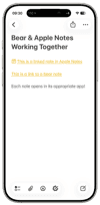
Apple notes is my “home base.” I use a loose version of the Forever Notes system that I have adapted for my own needs. When I need to write something in Bear, it is always linked somewhere in Apple Notes. This ensures that Apple Notes is always my “home base” and the first place I go to look for a note.
And the best part of this is that both apps are fast and beautiful on my iPhone.
This has been my system for well over a year now and it has worked. I still check out Obsidian and other apps from time to time, but thus far nothing has been able to lure me away from my Apple Notes+Bear Notes setup.
Tasks - Apple Reminders
Task management apps used to be another shiny object syndrome pitfall of mine, but I have stuck with Apple Reminders for years now and looked very little at other third-party solutions. Apple Reminders is, for me, the perfect task management app. It works well with Apple Calendars and Apple Notes and has all the features I find that I need. I share a few lists with my spouse and have no desire to mess with that set up. Even my kid has started using our shared grocery list to add things she wants. Apple Reminders has features like location-based reminders, attachments, and boards, all of which I use. It just works.
When I do find the need to use Apple Reminders with a different UI, I dabble with GoodTask, which has continued to update over the years and provide a nice alternative to Apple Reminders while still using Apple Reminders.
Read it Later - GoodLinks (and Apple Notes)

This was my biggest change in 2025 - moving from Reader by Readwise to GoodLinks. Now I LOVED Reader and was a heavy user of the app for quite some time. It is an app I still consider returning to about once a week. As an all-in-one reading app, it worked great. It was my read-it-later app for articles, my PDF reader, my ePub reading app, my RSS feed app….
BUT…..
I had concerns. My biggest concern was privacy. Like many services, Readwise has access to all your data. While they say they don’t sell it or use it, there’s nothing stopping the company from being acquired and someone else using your data.
Another issue was cost. I understand why developers charge subscriptions and am generally OK paying for a subscription. These apps aren’t built for free and many now have extensive infrastructure supporting them on the back end. But at some point, I have to consider my own bottom line. Increasing costs in general this past year have had our household re-evaluating in general what we pay for things. Streaming services and app subscriptions are just a couple of those things.
Finally, even when I read something in Readwise, I ultimately wanted to save it in Apple Notes. Could I just cut out the middleware here?
Ultimately, Readwise wasn’t worth the cost or effort. It was too often becoming a dumping ground for articles and other material I never circled back to. It was unwieldy and when I did want to save something, it ultimately ended up in Apple Notes anyway.
So now I use both GoodLinks and Apple Notes, and occasionally Bear.
GoodLinks is where I save articles I want to read, particularly if the web version has a lot of junk that I want stripped out. When I am done with an article, if it is worthy of saving, I send the highlights straight into Apple Notes.
But sometimes I just read in whatever app I am in (NYTimes, Apple News) and then send the article link with a few excerpts straight into Apple Notes.
If I want to clip an entire article, I use a short to clip to Apple Notes or Bear’s beautiful web clipper (both work great).
GoodLinks is great (private) way to read articles when I want a nice reading environment and ability to highlight, but most things I want to save can be saved straight into Apple Notes.
RSS Reeder - Reeder
I was a fan of the classic Reeder app by Silvio Rizzi, so the new Reeder app was an instant purchase. During the last year I did give several other RSS apps a try, and none of them worked as well as Reeder for me. I particularly like the ability to organize all my feeds into different categories so that I can pursue a single topic across many feeds.
Ai Tool - Gemini (with Perplexity and NotebookLM)

A late 2025 change going into 2026, but the winning Ai tool for me is Gemini. I have used ALL the major Ai tools over this last year - ChatGPT, Claude, Perplexity, and now Gemini and have put them all to the test.

2025 AI Wars: Google and OpenAI Battle for Dominance | MOONSHOTS
www.youtube.com

But Gemini 3.0 has blown them all away in terms of how to I work and what I need from an Ai tool. Gemini’s graphics development is by far the best, and it has done a solidly good job at deciphering my prompts and returning the information I need. Plus it helps that the Gemini pro subscription comes with lots of Google storage and other Google features. Yes, I am worried about privacy (with all these Ai tools), but I can’t deny how much they help with work and life in general.
What I really like about Gemini is the Gems. I tried to use custom GPTs with ChatGPT but could never figure things out technically to make them work. Gemini’s gems are much more user friendly.
I’ve also found that Gemini does a better job of following custom instructions and not hallucinating.
I don’t use Gemini alone, though. Gemini is my main Ai tool, the first place I go when I need something.
But Perplexity.ai remains a critical part of my workflow. I use Perplexity when I need accurate search results, which is frequently. When I want information returned with basic analysis but easily cited sources, I go straight to Perplexity.
I have also started using NotebookLM, which is Ai but for the sources identified for a specific project. NotebookLM is a game changer for anyone working in research.
Social Media - Bluesky (with a little Instagram and Threads)

I have cut down on my social media use a lot in 2025. Twitter is gone. Facebook and Instagram have become Ai slop cesspools, and Threads is largely rage-bait.
Bluesky has emerged as my main social media app of choice this year and the one I use the most. It has active communities of genuine people.
Instagram is mostly a private stay-in-touch app. It’s no longer a place for photography and I primarily use it to stay connected to friends and family.
Threads is filled with rage bait and fake accounts, so I don’t use it often. However, I have started using it to keep up with breaking news. While it is not and will never be Twitter, it is the closest thing I have found to a social media app that at least presents information on current events.
Latest
More from the site
Drea
ai
Software as a cult, and Ai is making us crazy
#ai #internetculture There was a really good post earlier in the week on the internet by a blogger someone over on Bluesky that has since been deleted, but it was something that really resonated with
Read post
Drea
applenotes
How I use Apple Notes and Bear Together
#applenotes #bearnotes #notetaking 🐻I love Bear Notes. The UI is gorgeous, it’s fast on mobile and Mac, and typing in Markdown is (for me) faster. I love how portable my files are in Bear too. Easy
Read post
Drea
diyloop
Ai in DIY Loop
#diyloop #t1d #ai One cool thing about the "the app that keeps me alive" is that people are always innovating on how to make it better. When I saw this video the other day about a new customization s
Read post