
t1d
The App that Keeps Me Alive
Written by
Drea
Published on
9/16/2025
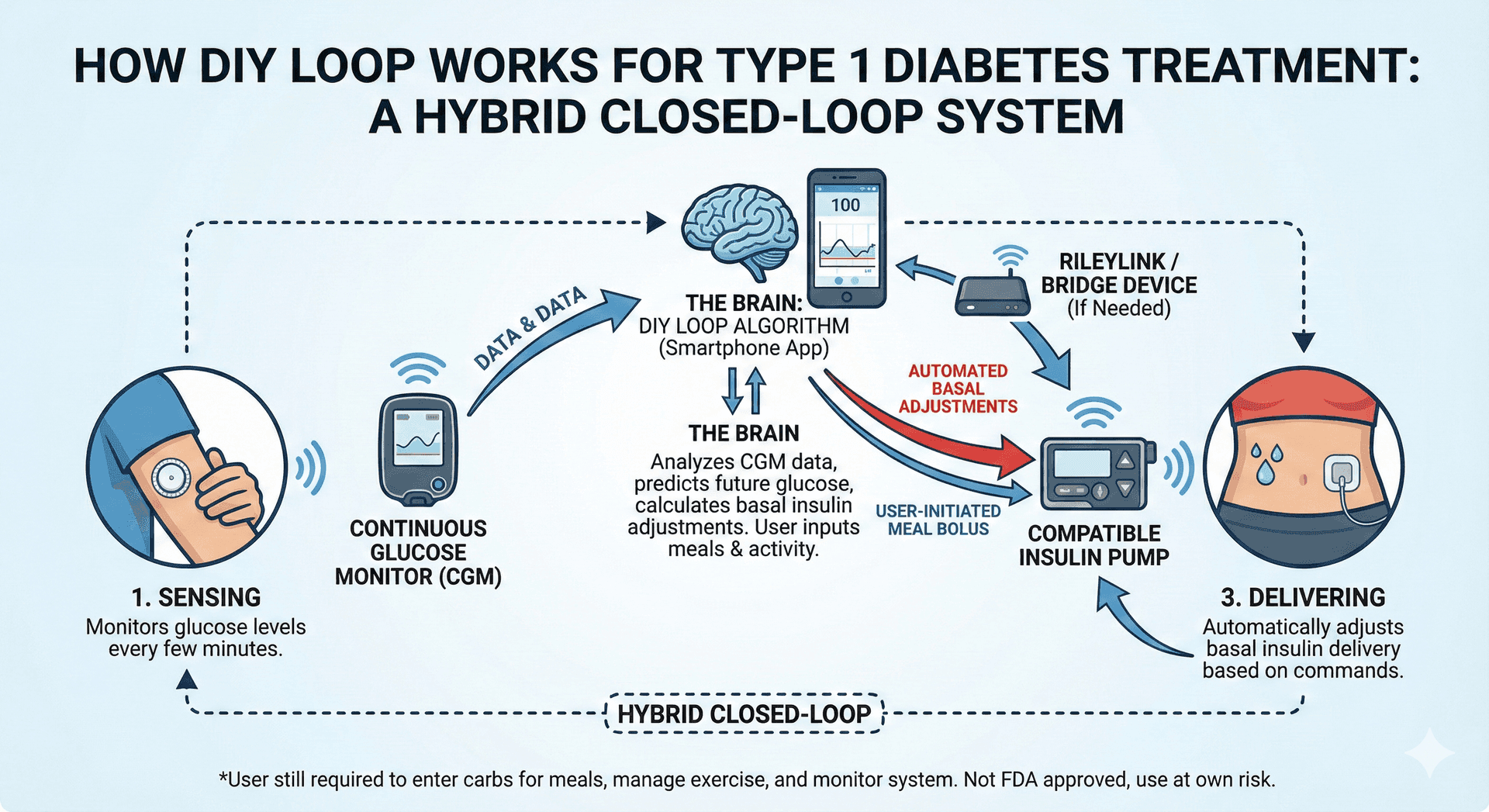
There is an app on my phone that keeps me alive. Literally.
It is an app that is testament not just to medical technology, but to the spirit of innovation and what a group of very ordinary people can accomplish when they come together to work on a problem.
You can't find this app in the App Store. Rather, it’s an app that you have to build using Xcode or Github. It is an app that, for a small group of people, has been lifesaving.
Type 1 Diabetes
I have type 1 diabetes. At the most basic level, type 1 diabetics have to replace the insulin they no longer produce. This seems simple enough, right? Just inject the missing hormone that you need to stay alive back into your body and you’re done! Right? Nope.
The elusive goal when managing type 1 diabetes is to achieve “normal blood sugar levels” as much as possible, generally considered to be between about 80 and 120, without killing yourself in the process. A person who is able to naturally produce their own insulin has a body that can achieve this through a tightly regulated and finely tuned system wherein specific cells in the pancreas produce small and precise amounts of insulin on demand, dump that directly into the bloodstream, and halt or reduce production whenever needed. People who produce their own insulin don’t even notice the myriad of factors that affect blood sugar levels. They don’t need to because their body notices and reacts for them.
But living with type 1 diabetes is like walking a tightrope 24 hours a day. While blindfolded. In the dark. With 100 mph winds gusting around you. And carrying a stack of fine china.
Type 1 diabetics stay alive by injecting insulin or infusing it via a pump, but in doing this have to make upwards of 180 decisions a day about how to administer that insulin or do other things in an attempt to keep blood sugar in that narrow healthy range. A drop too much insulin and blood sugar can plummet dangerously low, causing a seizure or death. Not enough insulin and blood sugar stays persistently high, causing long-term damage to the body or diabetic ketoacidosis (DKA).
Not long ago, every day was an hour-by-hour (and sometimes minute-by-minute) guessing game of what was affecting my blood sugar, how my blood sugar was going to react, how much insulin I needed for any given food or activity. No two days or scenarios were ever exactly the same, because when there are so many variables that affect your blood sugar, the various combinations are endless. Factors that most noticeably affect my blood sugar include: any type of food consumed, stress, weather, the seasons, activity level, hormone production, emotions, taking a shower, age of the insulin I’m using, hydration…..just to name a few.
Prior to about 2019, I was fortunate enough to be using the most cutting-edge, FDA-approved technology for managing type 1 diabetes - an insulin pump and a Dexcom continuous glucose monitor (CGM). My pump administered insulin at variable rates throughout the day that were pre-programmed, or with the push of a few buttons whenever I had a meal or needed to adjust the rate at which insulin was being delivered. My CGM gave a near constant readout of my blood sugar levels.
But this system had a huge flaw - my pump could not react to my CGM readings. The rate at which insulin was delivered was completely under my control and had to be programmed into the pump (by me with help from an endocrinologist) and adjusted multiple times a day (by me) to account for all those variables that affect blood sugar levels. It was imprecise, as are most things under human control, and exhausting. Mentally I was burned out. My CGM alerted me constantly to impending highs and lows and I found myself chasing these fluctuations always a few minutes too late because infused insulin does not work exactly the same as naturally produced insulin (due to the delay in the action time) and because it’s impossible to give anything this much attention while also trying to live a life.
Throughout the period of about 2010 to 2015, there was constant talk about how we would one day have an “artificial pancreas,” a system that would automatically adjust insulin needs in response to CGM readings using an algorithm. But it seemed a really long ways off due to all the regulatory hurdles and testing that needed to be done. And like many things in the medical device world, the end result was not likely to be nearly as amazing as people wanted.
Ordinary People Take Matters into Their Own Hands
In 2013, an amazing thing happened. A parent of a child with type 1 diabetes figured out a way to send data from his child’s from his Dexcom to the web, which allowed the child’s parents to be able to view his blood sugar even when away from one another. It was a huge step forward. Dexcom had been hinting that they were going to release a "share" feature that enabled this very function, but it never seemed to come to fruition. So parents took matters into their own hands and built the feature themselves.
The Nightscout Project was born.
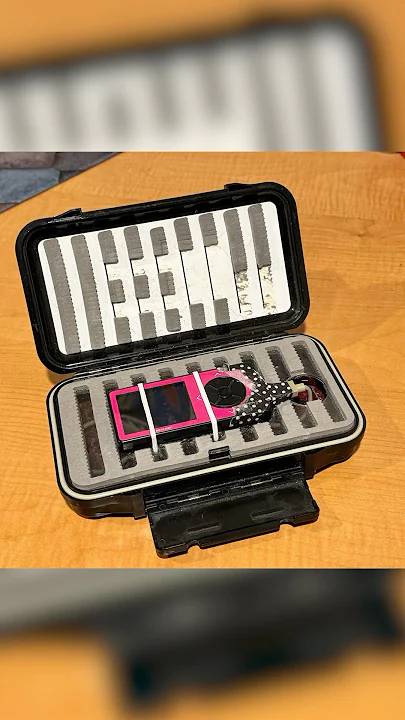
The Nightscout "rig" let T1Ds stream live CGM Readings over the cloud! #wearenotwaiting
www.youtube.com

This “hacking” of a medical device was met with cheers from the patient community and warnings and skepticism from health care providers and medical device manufacturers. But a door had been opened and it wasn't long before people were discovering that this system could be used for a whole variety of purposes, from displaying blood glucose data on Pebble watches to building analytical capabilities into the software that were far better than anything commercially available or that a doctor could do.
Someone Closes the Loop
The next big breakthrough came a year later when Dana Lewis successfully built her own closed-loop system. A breakthrough that medical device manufacturers had promised but failed to deliver was finally a tangible reality. By “closing the loop” between her pump and CGM, Lewis had built the first closed-loop system, putting an algorithm in control of the insulin delivery from her pump using the data from her CGM. The algorithm did the hard work.
Initially, this DIY artificial pancreas system (DIYAPS) was an Android device app and Raspberry Pi computer, along with an older model Minimed insulin pump (one that was no longer manufactured and was necessary because it had a specific flaw in its software that enabled it to be hacked). The instructions for setting this whole system up were incredibly complex, but volunteers helped simplify the instructions over time and more people began to join Dana Lewis in the quest for a better life with type 1 diabetes.
DIY Loop Comes onto the Scene
Fast forward to 2017. DIYAPS and DIY Loop were now both available as "do it yourself" closed-loop insulin delivery systems, the former being for Android devices and the latter for iPhones. However, both still only worked with those older-model Minimed pumps that were becoming harder to obtain. But this group of volunteers from around the world worked tirelessly to help others living with type 1 diabetes to access this technology.
I followed all of this news closely but remained hesitant to jump into the fray. I was not a programmer and the steps to build one of these apps seemed daunting. I had reservations about my endocrinologist's reaction to my using code downloaded off the internet to basically keep me alive. I also did not want to go back to a tubed pump; having recently transitioned to the Omnipod, I was really happy with tubeless and had no desire to start trying to hunt down after-market pumps that were getting more and more expensive on the black market.
I Meet Dana and my Perspective is Changed
In April 2017, I had a chance encounter with Dana Lewis who was presenting at a conference I attended. It was a pivotal moment. As we chatted in the lobby of the hotel, Dana shared with me her CGM data and the detailed workings of her closed-loop system and I was in awe. She told me she could go HOURS without even thinking about her blood sugar and come back to find it happily still in range. This seemed unthinkable to me because at that time I was checking my Dexcom every 10 minutes and making constant adjustments to my pump settings throughout the day.
I knew this was something I had to do. I had a toddler at home. I wanted to be around for my daughter for a long time and I could no longer ignore the very obvious ways T1 diabetes was affecting my health. I knew that if I wanted to see my daughter grow up, I had give this a try.
Dana informed me that some really awesome people were working hard to reverse engineer Omnipod so that it could be “loopable.” Dana suggested I get my feet wet by building my own Nightscout website to collect my CGM data and leverage some of the open-source analytical tools others had built. I figured I had nothing to lose. It was Dana's assurance that could do this gave me the push I needed.
My First Foray into the DIY Movement: Building my Nightscout Site
It turned out that building a Nightscout website wasn’t that difficult. The process for setting up a Nightscout site is daunting but I was shocked when I was able to do it in just a couple of hours. Despite having never heard of “GitHub” or “pull requests” or “repos,” I suddenly had myself a working website presenting data pulled from my CGM! It gave me confidence that with some patience and willingness to Google what I didn’t know, I could tinker in a way I never imagined possible.
I spent the next year playing with Nightscout and closely following the progress on Loop for Omnipod. I knew the group behind DIY Loop were trying to reverse engineer Omnipod to be usable with the Loop system, and I was confident this would still happen long before any commercial system was available for Omnipod.
In the meantime, I connected my Nightscout site to Autotune in an effort to learn how to fine-tune the basal rates on my pump. I was amazed at the information this tool, free and developed by volunteers, was able to provide. There was no commercially available software available to patients that was capable of doing what Autotune could do. After using Autotune just once, I was able to make some small adjustments to my pump settings that had a huge impact on my blood sugar. Autotune also gave me a taste of what could be possible with DIY Loop, and I wanted more.
Loop for Omnipod

Throughout 2018 I followed news closely of the efforts to “hack” the Omnipod and make it compatible with DIY Loop. In the Spring 2019 I saw the announcement on the Looped Facebook group that DIY Loop was now available for Omnipod. I immediately purchased my RileyLink, a small device that would communicate between my Omnipod and iPhone, and set out to “build” the Loop app.
The RileyLink was a device that allowed the phone and the Omnipod pump to communicate. The Loop app is the brains of the operation, containing the algorithm and all the information that takes the data from the CGM and tells the pump exactly what to do. But the Loop app is not available in the App Store, and the user has to build the app from scratch.
THANKFULLY amazing volunteers put together some of the best written instructions for something technical I have ever seen. Loop Docs are the Bible of building this system and I poured over them with an intense concentration I didn’t even know I possessed. By the time I went to actually build my Loop app, I could recite sections of those documents by heart.
And amazingly, it worked. On the first try. Flawlessly. In just about an hour (most of which was spent downloading Xcode onto my computer and letting the app build on my phone), I had the Loop app icon on my iPhone and the app running. Not only was I immensely proud of what I had been able to do, I knew this was the start of better health.
I started using the Loop app in what is called “open loop,” which is when an insulin pump is not adjusted by the algorithm, but the app gives you recommendations for basal rate delivery adjustments based on blood sugar trends. Seeing how often the app suggested a change in basal insulin delivery made me realize how impossible it was to manage this disease without automation and how beneficial Loop was going to be for me.
Within a few days, I was ready to “close the loop.” Hitting this button in the app gave the app the control, taking a burden off my shoulders that had existed for far too long.
For the first few hours after “closing the loop,” I just sat there and watched the app do its thing. Part of me was terrified. I was turning over the operation of my insulin pump, a life-sustaining medical device, to an app on my iPhone, an app that was built using code I had downloaded from the internet. This seemed insane.
But as the hours passed, my blood sugar stayed beautifully in range. I was amazed. A few more hours passed and the same thing. I soon got bored and went about the rest of my day. By evening, I realized that I had not received a single alarm on my Dexcom alerting me to a high or low blood sugar. I hadn’t even really thought about my blood sugar. For the first time, my brain was filled with other thoughts, non-diabetes thoughts. It was awesome.
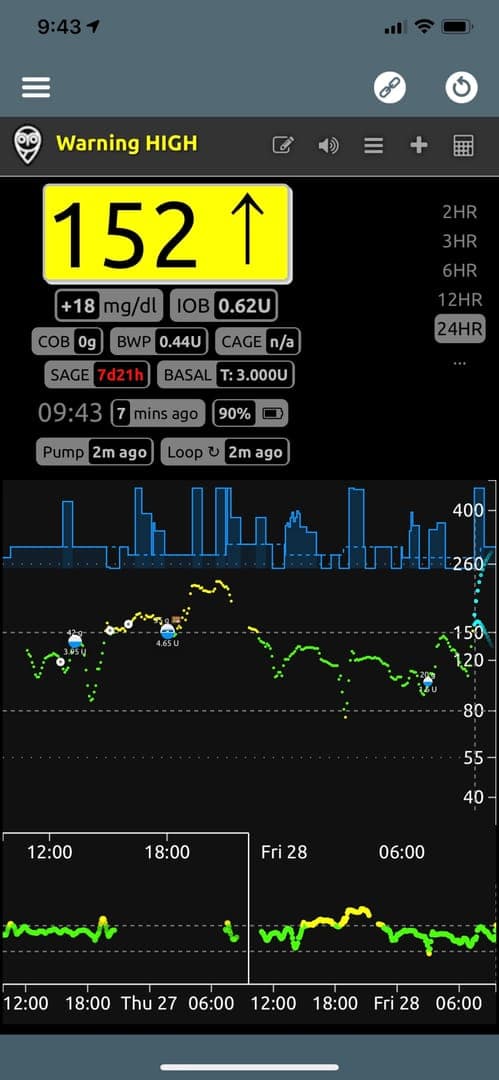
During the early days of using DIYLoop, I did have to make small adjustments, and I still checked the app and my blood sugar regularly. But as days and weeks passed and the system worked, I found myself checking less and less. I trusted the system because it showed time and time again that it did exactly what it was supposed to do. I felt like I was finally able to breathe.
The Current State of Affairs (as of December 2025)
A lot has changed in the years since I started looping more than 7 years ago.
- Loop now supports Dash pods via a Bluetooth connection, which means I no longer need an intermediary device to control my pump. This means one less thing to carry around and keep track of, which is awesome.
- A study (that I got to take part in!) was published backing up the safety and effectiveness of DIY Loop, which has led to much better support in the medical community. My endocrinologist fully supports my use of loop (YAY!) and is always asking questions about the app to increase her understanding of this technology.
- There are now other options for DIY systems, including iAPS and Trio. Both use slightly different algorithms than Loop and while I have tried them both and keep both on my phone, Loop is still my preferred app of choice.
- All of these apps can now be built using GitHub’s browser build method! This is amazing, as it no longer requires that you have access to a Mac computer running Xcode (an application that consumes insane amounts of hard drive space). Using any web browser (including Safari on my iPhone), I can now build the app via GitHub online and then deploys it to my iPhone via TestFlight. What I love about the browser build method is that it means even when traveling I have a way to easily rebuild and update my Loop app. No computer needed!
- Improvements are always being added by people who have an interest in making this system better. For example, I just started testing out a customization to Loop that leverages Ai to search for foods and calculate carbs and other nutrition information.
Today there are multiple commercially available systems that can, on some level, do what Loop does with automatic basal adjustments and blousing. However, many are closed systems with little or no transparency into how their algorithms work. These systems are slow to receive updates, often taking years to incorporate new technology or features that Loop and other DIY apps are adding within months. It is great that commercial options are available for people who want them, but I still prefer my DIY set up. DIY Loop remains a simple setup of just my pod, Dexcom sensor, and iPhone. There is something exhilarating about being able to walk out of my house with just my iPhone and these two small things attached to my body.
Before using DIY Loop, my life was largely dictated by fear of my diabetes. I was scared of going low, scared of the seemingly inevitable complications, scared of driving, scared of being alone. I was scared of not being around to see my child grow up.
But DIY Loop changed everything. Since starting DIY Loop, I no longer live in perpetual fear of type 1 diabetes. I eat freely, sleep more soundly, and think about diabetes so much less than I used to. Yes, it's annoying. Sure, I'd still love a cure. But now, for the first time in my life, I am OK if that elusive cure never comes along. Because this technology is closer to a cure than I could have ever imagined.
📰 Additional Reading & Resources
Origins of DIY Loop - The Incredible Story Behind the App, Diabetech YouTube channel
DIY Loop Automated Insulin - Mastering the System, Diabetech YouTube channel
Inside Loop’s Experimental AI-Powered Food Search, Great video by Diabetech of one of the latest customization options in Loop that uses Ai to search for food information.
Welcome to Nightscout - The Nightscout Project, The project that started it all!
The Robot Vacuum Ate My Pancreas | Only Human | WNYC Studios, Podcast episode featuring Dana Lewis, one of the first people to hack their insulin pump and set up an automated system, back when it was very complicated.
Insulin Pumps, Decapped chips and Software Defined Radios, The incredible story by Pete Schwamb about how they hacked the Omnipod insulin pump.
Loop - DIY Automated Insulin Delivery System, instructional YouTube video series.
Loop and Learn | Master Your DIY Closed-Loop Insulin Delivery System
Experience: I built my own pancreas, More from the awesome Dana Lewis.
The History of Loop and LoopKit
Evolution of Do-It-Yourself Remote Monitoring Technology for Type 1 Diabetes
History and Perspective on DIY Closed Looping
How a Group of Amateur Hackers Transformed Diabetes Care
Do-It-Yourself (DIY) Closed Loop Systems: Perspectives of an Endocrinologist
The diabetes patients who hacked a pancreas
How I designed a “DIY” closed loop artificial pancreas, Dana’s blogpost on the original DIYAPS.
Latest
More from the site
Drea
ai
Software as a cult, and Ai is making us crazy
#ai #internetculture There was a really good post earlier in the week on the internet by a blogger someone over on Bluesky that has since been deleted, but it was something that really resonated with
Read post
Drea
applenotes
How I use Apple Notes and Bear Together
#applenotes #bearnotes #notetaking 🐻I love Bear Notes. The UI is gorgeous, it’s fast on mobile and Mac, and typing in Markdown is (for me) faster. I love how portable my files are in Bear too. Easy
Read post
Drea
diyloop
Ai in DIY Loop
#diyloop #t1d #ai One cool thing about the "the app that keeps me alive" is that people are always innovating on how to make it better. When I saw this video the other day about a new customization s
Read post