applenotes
Saying goodbye to the oldest app on my phone
Written by
Drea
Published on
1/2/2026
And a new journaling routine for 2026
#applenotes #bearnotes #journaling
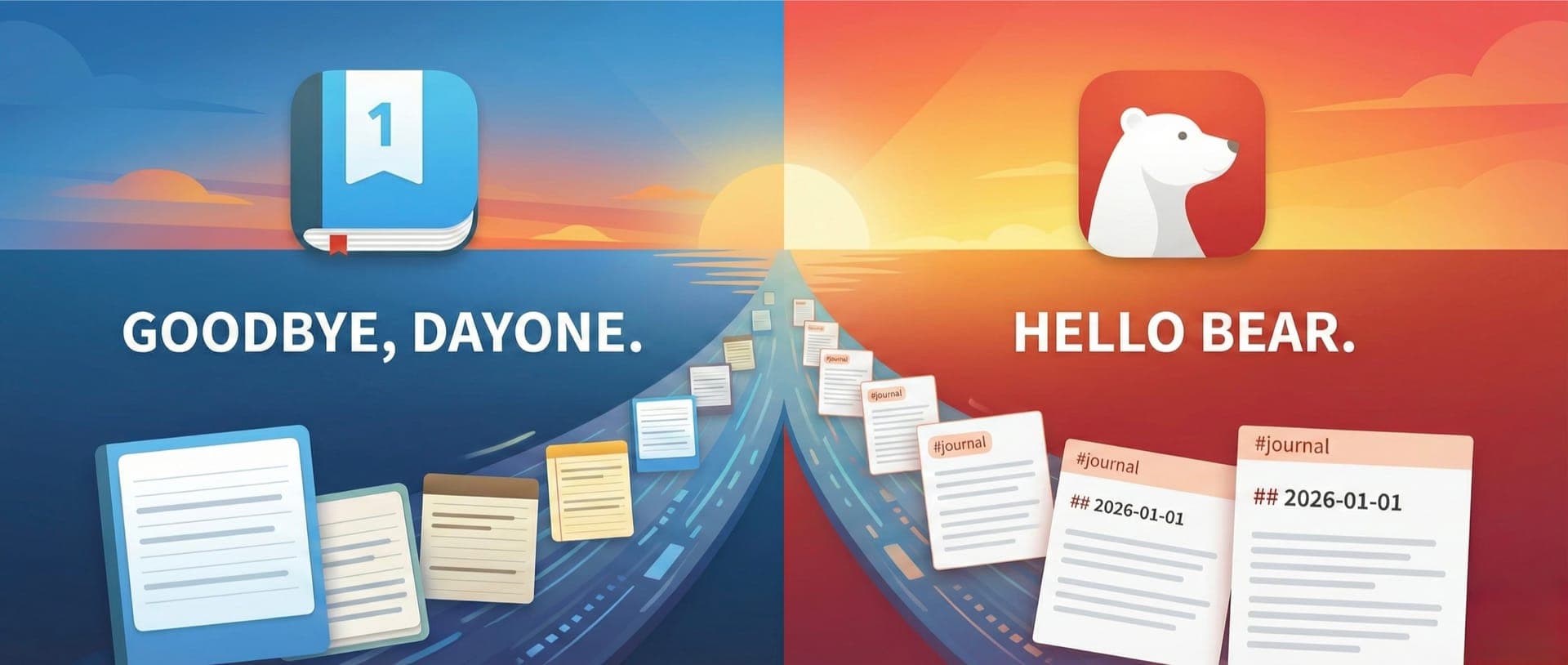
I finally made the decision to switch from DayOne to Bear Notes for my journaling…or at least the decision to give it a try. This was not a decision I made lightly; DayOne is the longest-running third-party app on my iPhone.
I started using DayOne in 2011, not long after it was released and it has been my digital journal ever since. I am not very consistent with journaling but have done a decent job of keeping streaks going, particularly during times that were difficult or when my daughter was a baby and toddler. At least a few times every month I make an entry, but it’s often more. The result is more than 2,000 entries spread out over 14 years.
Why make the move?
I made the decision to move my journaling to Bear Notes for a few key reasons.
- I love the Bear interface (especially its themes). The UI is clean and conducive to writing. It feels more inviting, and is very fast on mobile whereas DayOne has started to feel more cluttered.
- Bear’s export functionality makes the app more interoperable and future-proof, as it can export to a variety of formats including true Markdown files. Having my memories in portable Markdown files is very important to me. While Obsidian would be the MOST portable, Bear Notes is a very close second. DayOne has a quirkier export functionality. (This person describes the issues one can run into when trying to export DayOne entries into Markdown files.) I have exported notes from Bear many times and had zero issued with file portability, whereas DayOne exports require a lot more work.
- I’ve had a few experiences recently of DayOne corrupting entries and photos or other media getting lost. This mostly appears to affect entries made using the share sheet functionality and I thankfully didn’t make too many entries that way, but it was still disappointing.
- The two main notes apps I use are Bear Notes and Apple Notes. Journaling in DayOne felt like I was managing a third note taking app. Since my writing is all done in Bear, having the ability to link my journal entries to work I’m doing or articles I’ve saved just seems like a natural fit.
- DayOne was acquired by another company about a year ago. I grew to love the app when it was a small team of developers managing it, so I was not thrilled about this new direction and had concerns about privacy and potential lock out.
- DayOne has a lot of features I don’t use. I sometimes used the map to display where entries were made, but that’s about it. I don’t typically use multiple journals, prompts, or any of the other features.
- DayOne is another subscription. I’m not opposed to subscriptions and understand why they exist but at some point I can only afford so many subscriptions.
What do I lose in this switch?
Having used DayOne for so long, I carefully considered what I’d be losing by switching from DayOne to Bear, and whether those features could at all be replicated in Bear.
I occasionally used the “on this day” feature, but that’s easily replicated with a shortcut. I sometimes looked at the map, but not enough for it to be a dealbreaker. Journaling prompts can be found anywhere and while I liked the ability to pull metadata from photos to set the location and time of an entry, it was not a critical feature for me since the metadata is still in any photo I take.
In the, I realized there was no feature significant enough to outweigh what I could gain by switching to Bear, so I decided to make the move on a trial basis.
Making the Switch
Step 1: I started by doing some cleaning up in DayOne, mostly deleting entries that were blank or irrelevant. I also deleted an old journal that was Instagram imports (from when DayOne used to sync with Instagram but then suddenly stopped). I put everything that remained into a single journal.
Step 2: The biggest challenge in this endeavor was modifying my exported DayOne JSON file so that 1) entries on the same date were merged into a single entry with timestamps, and 2) the title of each entry was changed to the date (in YYYY-MM-DD format). I wanted to do this so that my entries imported into Bear were easily sortable even if the creation date got messed up. I asked Gemini to create a Python script and tell me how to run it. It took a few tries to generate a script that did everything I wanted but this is the Python script that ultimately worked:
import json
import datetime
from collections import defaultdict

# --- CONFIGURATION ---
INPUT_FILE = 'Journal.json'
OUTPUT_FILE = 'Merged_Journal_All_Media.json'

def parse_iso_date(iso_string):
    """Parses DayOne ISO timestamp into a datetime object."""
    try:
        clean_iso = iso_string.replace('Z', '+00:00')
        return datetime.datetime.fromisoformat(clean_iso)
    except ValueError:
        return datetime.datetime.now()

def get_date_key(iso_string):
    """Extracts YYYY-MM-DD string."""
    return iso_string.split('T')[0]

def format_time_display(dt_object):
    """Formats datetime object to 12-hour time (e.g., 02:30 PM)."""
    return dt_object.strftime("%I:%M %p")

def main():
    try:
        with open(INPUT_FILE, 'r', encoding='utf-8') as f:
            data = json.load(f)
    except FileNotFoundError:
        print(f"❌ Error: Could not find '{INPUT_FILE}'.")
        return

    entries = data.get('entries', [])
    print(f"📂 Loaded {len(entries)} entries. Processing...")

    grouped_entries = defaultdict(list)
    for entry in entries:
        date_key = get_date_key(entry['creationDate'])
        grouped_entries[date_key].append(entry)

    new_entries = []

    # List of attachment keys Day One might use
    attachment_keys = ['photos', 'audios', 'pdfs', 'videos']

    for date_key, daily_batch in sorted(grouped_entries.items()):
        # Sort chronologically
        daily_batch.sort(key=lambda x: x['creationDate'])

        first_entry = daily_batch[0]

        merged_entry = {
            'uuid': first_entry['uuid'],
            'creationDate': first_entry['creationDate'],
            'location': first_entry.get('location'),
            'weather': first_entry.get('weather'),
            'tags': set(),
            # Initialize empty lists for all possible attachment types
            'photos': [],
            'audios': [],
            'pdfs': [],
            'videos': []
        }

        text_blocks = []

        for item in daily_batch:
            # 1. Handle Text
            raw_text = item.get('text')
            if raw_text is None: raw_text = ""
            raw_text = raw_text.strip()

            # Fallback to richText if text is empty
            if not raw_text:
                raw_text = item.get('richText', '')
                if raw_text is None: raw_text = ""
                raw_text = raw_text.strip()

            if raw_text:
                dt = parse_iso_date(item['creationDate'])
                time_str = format_time_display(dt)
                block = f"**{time_str}**\n{raw_text}"
                text_blocks.append(block)

            # 2. Handle ALL Attachment Types
            for key in attachment_keys:
                if key in item and isinstance(item[key], list):
                    merged_entry[key].extend(item[key])

            # 3. Handle Tags
            if 'tags' in item:
                for tag in item['tags']:
                    merged_entry['tags'].add(tag)

        # Build final markdown
        full_body = "\n\n---\n\n".join(text_blocks)
        final_text = f"# {date_key}\n\n{full_body}"

        merged_entry['text'] = final_text
        merged_entry['tags'] = list(merged_entry['tags'])

        # Clean up empty fields (so we don't have empty "audios": [] in JSON)
        for key in attachment_keys + ['location', 'weather']:
            if not merged_entry[key]:
                del merged_entry[key]

        new_entries.append(merged_entry)

    output_data = data.copy()
    output_data['entries'] = new_entries

    with open(OUTPUT_FILE, 'w', encoding='utf-8') as f:
        json.dump(output_data, f, indent=2, ensure_ascii=False)

    print(f"✅ Success! Merged {len(entries)} entries.")
    print(f"💾 Saved as '{OUTPUT_FILE}'.")

if __name__ == "__main__":
    main()
Step 3: I exported my DayOne journal into a JSON file archive and unzipped it. I saved the above python script in the folder with my DayOne export and then ran it from the terminal.
Step 4: The python script resulted in a new JSON file. I took that new file and zipped it along with the folders for video, audio, and photos.
Step 5: I imported my new archive zip file back into DayOne in a new (separate) journal from my original. I was excited to see that all my entries had been merged appropriately and renamed with the YYYY-MM-DD format.
Step 6: From here, I simply followed Bear’s instructions for migrating from DayOne and it worked! All my entries were now in DayOne, title formatted correctly and even the creation date preserved.
The biggest issue I ran into was some entries with missing media (mostly audio files). This only affected about 30 entries, so I was able to manually copy over the media from DayOne into Bear for each of those entries. I also did some manual clean up, which mostly included bulk editing entries to tag them with #journal/YYYY and remove any extraneous tags.
Bear Journaling Workflow
I decided to come up with an entirely new workflow for journaling in Bear for 2026, one that will hopefully help me journal more consistently.
I set up a shortcut that will run every day at 6:30 AM to create a new journal note for the day. The great thing about this shortcut is that it automatically pins the “journal” note for the day to the top of Bear (and unpins the old one). The shortcut imports some basic data like location and weather and formats the note how I want it for journaling.
I added another shortcut that I can activate via my iPhone’s action button whenever I want to add an entry to my daily journal note. This shortcut provides a timestamp with each entry and appends the entry to the end of that day’s note. (Note: because this will only append entries to the end of a note, it is important to have the journaling part of a note at the end.)
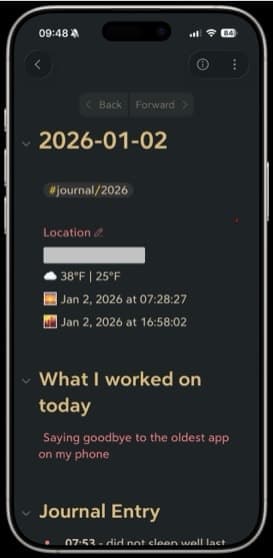
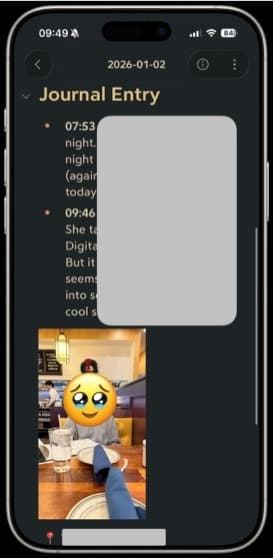
I like keeping track of locations and while I can’t use the location data in my Bear entries to view my entries on a map, I still want to have that information with my entries. For now, I will simply get the location from Apple Maps and share it as a link.
To keep my entries organized, I am using the tag #journal/YYYY. I feel like organizing my entries by year is sufficient for now.
I am also experimenting with another shortcut that adds voice entries to Bear. I never used the audio recording feature much in DayOne but I do use it sometimes in Apple Notes and wanted a similar feature for Bear just in case I found it useful.
Why not just use Apple Notes?
I considered this but nixed the idea for a few reasons. First and foremost is file portability. While Apple Notes has improved in this regard (files can be bulk exported in Markdown on the Mac), it’s still not as smooth of a process as exporting from Bear.
Markdown and UI is another big reason. I LOVE writing in Markdown and the UI of Bear is vastly better than that of Apple Notes (at least in my opinion).
Finally, Apple Notes is great and I do use it, but it does NOT do well with lots of notes and long notes. Long notes get laggy, and when I exceeded more than 2,500 notes in Apple Notes, the whole app got sluggish and was prone to crashing. Bear notes is much more stable. I have almost 4,000 notes in Bear right now and it performs with zero issues.
Final Thoughts
We will see how this experiment goes. I still have DayOne and haven’t deleted anything from there yet, and my subscription is active until June. Six months is enough time to see if this experiment works. At this point, I make no final predictions.
I am hoping that using Bear helps me write more consistently, both because it’s already an app I use throughout the day and I prefer it as a writing environment. TBD.
Latest
More from the site
Drea
Trying a digital camera….again
#blog/published For most of the last 15ish years (maybe even longer), my primary camera has been my iPhone. I’m not a photographer but I enjoy taking pictures, sharing them with others, and occasiona
Read post
Drea
socialmedia
I miss Twitter, and so far nothing has replaced it
#socialmedia I miss Twitter so much. It’s dead and never coming back and I have tried to accept that. I never cared for Facebook, the Myspace days were too fleeting, and Instagram was ruined once Met
Read post
Drea
apps
Cleaning up my messy read-it-later workflow
#apps #productivity My read-it-later (RIL) and bookmarking workflow is a mess. Digitally, my stuff is just…scattered. Random tidbits in Apple Notes, a graveyard in Bear Notes from when I imported old
Read post